

Want to fix “This Copy Of Windows Is Not Genuine Build 7600/7601 Error?” Fixing error This copy of Windows is not genuine is very easy. If you install pirated Windows 7 OS build 7600/7601, it will run only for some months. After that, you will get an error This copy of Windows is not genuine.
You will see many issues like a blank screen, getting stuck, degrading performance, etc., In this tutorial, I am going to show you the procedure to fix the error” This Copy Of Windows Is Not Genuine Build 7600/7601 Error?”.
What Does “This Copy of Windows Not Genuine” mean?
Most of the People get this error after installing a build 7600/7601 KB970133 update. There are various reasons for getting this error.
- The first reason is, You did not buy the Windows and Probably you are using the pirated version.
- You might have been using the key which was already using on some other computer.
- Probably you might have an outdated version. Your OS might need an update.
- Probably you might have the virus or malware which corrupted your original key.
If you bought the original OS, probably you might get the issue from any one of the above last three reasons. You can solve them easily.
When you did not have the original OS, you will get the issue with the first reason. This tutorial will show the solution to that reason.
- Read: 4 Steps to Increase computer speed | speed up Windows PC(XP,7,8,8.1)
- Format memory card, pen drive(Tip to remove the virus completely)
- How to remove malware from the computer with a free tool
Note: This procedure does not convert nongenuine OS to genuine. It makes use of nongenuine OS without problems and updates. If you want complete features and updates, you must buy Genuine OS from Microsoft Store only.
Suggestion: I can suggest to you that, Don’t buy Windows OS from any third party. Because I have seen many comments in this post that so many people are getting a non-genuine error, even though they use the original OS which was bought from third-parties. So Buy Windows from Microsoft Windows store only. So, if you get any problem in the future, Microsoft will help you.
Don’t want to buy Original Windows OS and don’t want to spend money, then continue reading this article.
How Do I Get Rid of This Copy of Windows is not Genuine?
This method will work for 32 bit and 64-bit versions of Windows 7. You must follow below three steps below to eliminate the error. Even when you don’t see the error after the second step, you must follow the third step. Otherwise, you may get this error back once again.
Before following the first step i.e., uninstalling the update, it is recommended to take the backup of your PC data. I recommend you to use EaseUs Todo Backup to back up your data.
Total Time: 6 minutes
Step 1: Uninstall Update KB971033
KB971033 is a Windows update that installs Windows activation technologies. You are getting the error ” This copy of Windows is not genuine” which means your OS has a KB971033 file which can detect your Windows OS Genuity. So before going into the actual procedure, You must uninstall the update which was detecting your Windows. Remember, if you see this mentioned update, then only you need to uninstall. If you don’t see this update, you can skip this step. Follow the below steps to uninstall Windows update.
1. Open control panel.
2. Click on Programs.
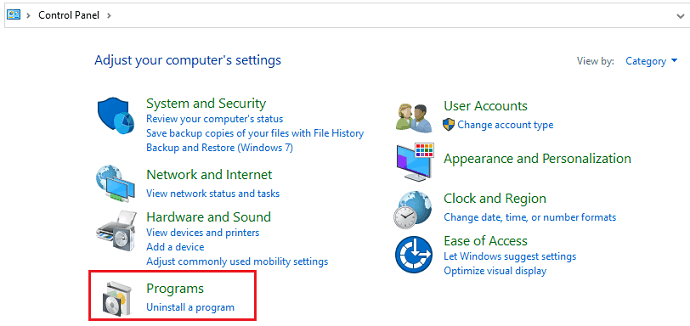
3. Then you will see the options related to the programs as shown in the below image. Click on View installed updates.
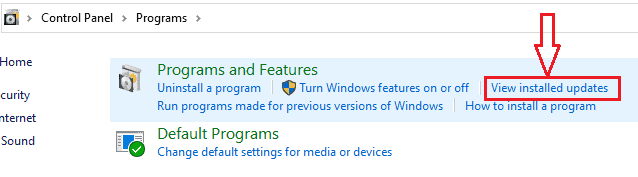
4. After loading all installed updates, check for update “KB971033” and uninstall.
5. Restart your PC. If you don’t see the mentioned update, you need not uninstall any update. You can leave this step and proceed to the second step.
Step 2: Use SLMGR -REARM command
Now Let’s see the actual procedure to fix Windows not a genuine error.
1. Go to Start Button for Start Menu.
2. You need to type cmd in the search field.
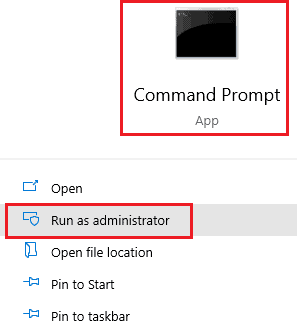
3. You will see the Command prompt option. Select Run as Administrator. It is must run the command prompt with administrator privileges otherwise command will not work.
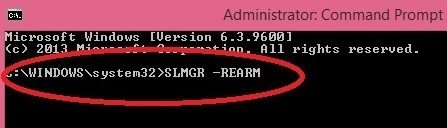
4. Type SLMGR -REARM (SLMGR is a tool that manages Windows software license. REARM is a command which resets the license status of the machine.) and press enter.
5. You will see a window, Click OK.
6. Just Restart your PC. Now you will never receive the error message. If this command did not work for you, you need to try SLMGR /REARM.
SLMGR -REARM must work for Windows 32 bit version. It may work for Windows 64 bit version. If it did not work for Windows 64 bit version, then only you have to try SLMGR /REARM.
Step 3: Turn off Updates
You are not using the original OS, so you are not authorized to get updates. And you must turn off updates. Otherwise, you will get the same error one more time. If you don’t turn off updates, your OS will get updated. Anyone of the future updates may detect your OS Genuity. So there is a chance that you will get the error one more time. Just follow the below procedure to turn off updates.
1. Go to the Control Panel.
2. Click Windows Update.
3. Click Install updates automatically (Recommended).
4. You must select Never Check for Updates(Not recommended).
Some Issues and Solutions
In most cases above command works. Sometimes, there is a chance that you may get any one of the below errors or issues. I have given solutions to those errors.
1.How to Fix the Error “0xc004d307: The maximum allowed number of rearms has been exceeded”?
You might get the error “Error 0xc004d307: The maximum allowed the number of rearms has been exceeded” after entering the command.
Most of the people got a permanent fix with the above procedure. But some might informed that they could use Windows only for 30 days and you need to reuse the command SLMGR -REARM one more time after 30 days. And Windows allows only three times to use the command. After three trials of the command, you will get the Error 0xc004d307.
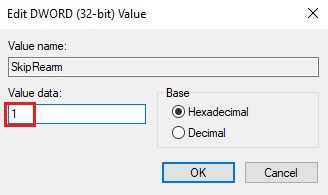
After using command SLMGR -REARM three times, the “SkipRearm” registry key will become “0”. You need to change the “SkipRearm” registry key to “1” to use the command another three more times.
You can find “SkipRearm” by going into the following location from the “Registry Editor“.
HKEY_LOCAL_MACHINE/SOFTWARE/Microsoft/Windows NT/CurrentVersion/SoftwareProtectionPlatform Follow below step by step procedure to go into the above place.
1. Press “Windows + R” you will see the Run dialog. Or Go to Start,
2. Click the Run option.
3.Type “Regedit”. Click OK to see the Registry editor window.
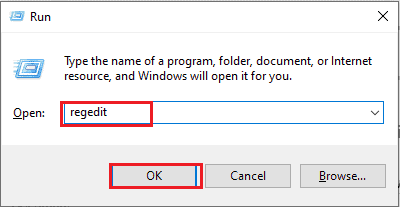
4. Click on the arrow mark which is left to “HKEY_LOCAL_MACHINE”.
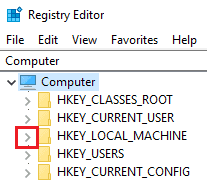
5. Click on the arrow mark which is left to “SOFTWARE”.

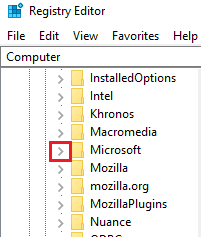
6. Click on the arrow mark which is left to “Microsoft”.
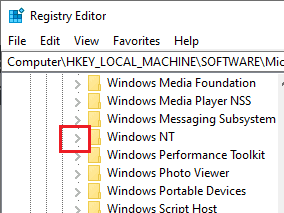
7. Click on the arrow mark which is left to “Windows NT”.
8. Click on the arrow mark which is left to “CurrentVersion”.
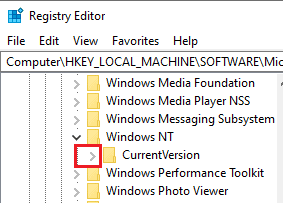
9. Now click on the word “SoftwareProtectionPlatform”, not on the arrow mark.

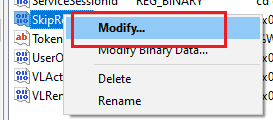
10.Right-click on “SkipRearm” in the right window.

11. Click on “Modify”. Change “Value Data” to “1”.
12. Restart PC.
Now you can try the command SLMGR -REARM.
You can also read How to Fix Error oXcoo4d307 to maximize allowed re-arms for complete details.
2. How to fix the”slmgr is not recognized as an internal or external command”?
If you get the error “slmgr is not recognized as an internal or external command” after entering the command. Read my article 5 Ways to fix SLMGR is not recognized as an internal or external command.
3. Blank Screen
If you get a blank screen even after following the above steps, just change the background in system properties.
4. Not genuine error still exists
Sometimes Not Genuine error might not be gone even after following the above methods. Because there might some files lost in your current OS. You need to reinstall Windows 7 from any CD/DVD and follow the above procedure carefully. Then you will never get This copy of Windows is not a genuine error.
Final Word
When you follow the above methods properly, you will not see any errors in the future. You can use your OS forever but without updates.
Remember, Always hackers attack older versions of OS and software on your computer to place malware and to hack your details. I always recommend you use the latest versions of OS and any software. Then only your computer will be free from viruses and your data will be safe. It is best to buy Genuine Windows OS from Microsoft Store.
- Next Topics To Read: Where / How to buy Windows OS? Which version should I buy
- Windows 10 Comparison with features
- Windows 10 Home Vs Pro: Differences you need to know
If you like this solution for the error This copy of windows is not genuine, please share it. Want more tips, please follow whatvwant on Facebook and Twitter. Subscribe to whatVwant channel on YouTube for regular updates.
I’ve used this technique many times successfully, but every time I have had to use the SLMGR -REARM or SLMGR /REARM) step later when it reverts to a “This copy of Windows is not genuine” state. Now it is telling me that I have rearmed the maximum amount of times and will have to reinstall the OS. Is there a way to get around this, too? Thanks.
Try http://whatvwant.com/fix-error-0xc004d307-re-arm/
Hi Jinka, it worked great for me, and i did it about three or four times. But today appeared again, i followed all your instructions as usually, but didn´t worked this time. I also went to my pc properties to see if the system is activated or not, and i found it´s activated, but still the message on my bottom right corner, Don´t know what to do. Any suggestion? Thanks and best regards from Argentina
Hello,
I hope you can help me with this.
I tried few months ago with the system you proposed here and it worked wonderfully. Since then, Windows updates have been blocked. However, after a some time the hideous “Windows 7 Build 7601 This copy of Windows is not genuine” message appeared again. I tried again with your method but, unfortunately, this time it is not working. Moreover, I looked for update KB971033 and is not there.
I have been tempted to update or reinstall Windows as you suggest, but I am afraid some of my programs may disappear.
Thanks for any help you can give,
Below link will also help you http://whatvwant.com/fix-error-0xc004d307-miximize-allowed-re-arm/
Only after reinstalling OS, you will get permanent solution.
Hi,
Thanks for your promt answer but, unfortunately, this is not my problem. I can actually rearm, and the meesage indicating that rearm is complete appears. The point is that, after restarting the computer, the not genuine message still appears. I have tried rearming few times, but the problems si still there.
I remember to have seen on this site that you can rearm only three times. Afterwords this option is also gets locked. The only permanent solution is buying a genuine copy !
When you do it properly, you will get permanent solution. Because I have seen it. For that you need to re install OS and do procedure properly.
Hi Ruiz,
I am facing exactly the same problem. Kindly share the solution if you could find one.
Thanks,
Andy
Thank you, number 2 worked for me
Great site. will recommend to a friend. it was useful
I could successfully removed ” this copy of windows is genuine” by using c:\windows\system32>SLMGR -REARM. My copy of windows seems to be activated already. Can I now go for auto update ? Pl suggest.
Thanks,
If you did not buy OS, you should not go for updates.
Thank u Madam, I could fix the problem “copy of this windows not genuine” by using cmd c:\WINDOWS\system32>SLMGR -REARM. Actually I had windows Vista for the lost 6 years. 2/3 months back the keyboard stopped on my laptop. I gave it for servicing to a local computer shop. They have fiddled with my device and during repairing they had installed win 7 to please me as if they have done great service to me. Any way I lost the Original copy of Vista. This laptop was bought in USA by my son in 2009.
Now I could activate windows 7 and it shows it as a genuine version and they (MS) are offering free update to windows 10. Can I go for it ? At present I stopped auto update of windows. Can I opt for auto update as it show clearly “you have activated successfully”. pl help me to decide at the earliest.
Thank you once again,
Natesan Ramaswamy.
If you have Original OS, you can go for windows10. Try to update windows 10, you will not get any issue if it is original. If it is not original OS, you can not update to windows 10, then you need to buy WIndows 10 from microsoft store through below link.
http://whatvwant.com/go/windows
the command SLMGR doesnt work on my pc, can anyone help me ?
Are you running it as admin? I know it’s a dumb question but I was having the same issue, and that was my error.
Thank you for the tutorial, but I have a problem.
I didn’t have any inconvenient nor any error while I was following the instructions and at the end it seemed to had worked perfectly BUT the “not genuine” message came back after a month or so.
So I did this very same tutorial again and double checked every step. And it worked, again… but the “not genuine” message came back, again, after a while.
As I said, I double checked every step, so by the second and third time I was doing it, there was no “KB971033” update installed and “never check for updates” was already selected because I had already done that the first time.
I don’t know what could possibly gone wrong.
Thanks for your time reading this.
You can try procedure given in http://whatvwant.com/fix-error-0xc004d307-miximize-allowed-re-arm/ to extend for 3 months. But Instead trying one more time, I suggest you to re install OS and follow procedure. Then you will get permanent solution.
Thank you so much for this, easy solution and really works.
tank you its very easy solution, and this working on my pc ..
thank you very much